Developer CLI & Workflows
The zirzir CLI gives developers and AI agents terminal access to the full Zirzir orchestrator.
🔑 Browser OAuth Loopback Flow
Section titled “🔑 Browser OAuth Loopback Flow”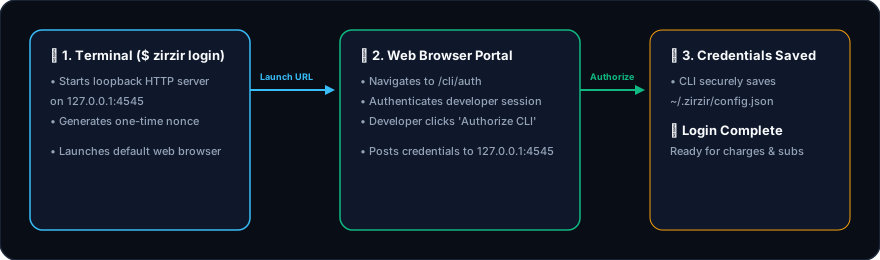
⚡ Core CLI Commands
Section titled “⚡ Core CLI Commands”1. Save provider credentials
Section titled “1. Save provider credentials”zirzir login stores your Zirzir API key. Provider keys (LakiPay, Chapa, …) live on the server project. Set them from the CLI:
export LAKIPAY_PUBLIC_KEY='pk_...'export LAKIPAY_SECRET_KEY='sk_...'
zirzir provider set lakipay# or explicitly:zirzir provider set lakipay \  --public-key "$LAKIPAY_PUBLIC_KEY" \  --secret-key "$LAKIPAY_SECRET_KEY" \  --set default_medium=TELEBIRR
zirzir provider list
--env defaults to the environment from zirzir login (test or live). Secrets are stored on the server; provider list prints redacted values.
2. Test Charges Directly from Terminal
Section titled “2. Test Charges Directly from Terminal”zirzir charge --amount 350 --currency ETB --provider lakipay --phone 09112233443. Create Hosted Payment Links
Section titled “3. Create Hosted Payment Links”zirzir link create --amount 1250 --currency ETB --title "Freelance Consultation"4. Create Subscriptions
Section titled “4. Create Subscriptions”zirzir sub create --plan plan_pro_monthly --provider telebirr --phone 09112233445. Simulate Webhook Events (Zero Money Spent)
Section titled “5. Simulate Webhook Events (Zero Money Spent)”zirzir trigger payment.succeeded --provider telebirr --amount 500.0zirzir trigger payment.succeeded --provider mpesa --amount 1200.06. Forward Webhooks to Localhost
Section titled “6. Forward Webhooks to Localhost”zirzir listen --forward-to http://localhost:3000/api/webhooks7. Inspect and Correct the Ledger
Section titled “7. Inspect and Correct the Ledger”zirzir ledger accountszirzir ledger postings --status failedzirzir ledger retry <payment-id>Balances, history, transfers, holds and failed postings: see the ledger guide.